1. How do I log into my website’s backend/admin panel?
Logging into your website will vary based on what CMS your site uses. Use the username and password we provided prior to site launch. For WordPress, just add “/wp-admin” at the end of your site URL to access the login (unless you requested a plugin to use a non-standard URL for login). For nopCommerce, you can log in using the customer login link often located in the header of the site. If your site is a DNN site, the login is typically a link in the footer.
2. What happens if I forget my login credentials?
All CMS platforms typically include a “Forgot Password” link on the login screen. If you still can’t log in, reach out to us and we can reset your account.
3. How often should I back up my website, and is it automatic?
Your site is set to back up automatically daily. The backup is captured nightly when there is typically less site traffic.
4. How do I update WordPress plugins, themes, or software without breaking the site?
If you have a maintenance agreement, we handle this for you. If not, update one plugin at a time, and check your site after each update to avoid conflicts. For more details, check out our WordPress Maintenance Information.
5. What should I do if my website goes down or I see an error?
We do have monitoring in place for the websites we host. Often, our internal protocols can resolve a site that is not responding before we have to manually intervene. If you’re viewing a site and it’s not responding, give it a couple of minutes because it may just be restarting, which is part of our protocols. Some CMS platforms also have regularly scheduled application restarts, which clear the cache and keep sites running smoothly. This process usually takes a few minutes at most.
After a couple of minutes, refresh the page and clear your browser cache. If it’s still not loading, try using your phone data rather than Wi-Fi to ensure it’s not something specific to your internet service. If it’s still down, give us a call or submit a support ticket — we’ll investigate and work to get your site back online.
6. Who owns the domain name and hosting account?
Ownership of domains and hosting is unique to each client. If you had us purchase a domain for you, we own it. You can always request domain transfer to an account you control if your situation changes. While Foremost Media does host websites, we also have clients who opt for a hosting service of their choice. If you own your domain and have your site on your own hosting service, keep login credentials safe, as they give you control of your online presence.
7. How secure is my website against hackers and spam?
Your website has security measures in place, and we routinely perform updates and apply patches at the server level. While no site is ever completely immune to threats, keeping everything updated and using strong passwords are key steps in maintaining security.
We recommend performing maintenance on your website on a regular basis. For WordPress sites, this would include updating your theme and plugins as updates are available. If you’re not comfortable handling these updates yourself, you may want to consider a support or maintenance agreement. Our Foremost Media Support Team can take care of these updates for you to help keep your site secure and running smoothly.
8. How do I add or remove users with different permission levels?
WordPress
In your WordPress dashboard, go to Users > Add New. Choose a role:
- Admin: Full access
- Editor/Author: Content only
- Subscriber: Limited view
If unsure, give the lowest level of access needed.
nopCommerce
Manage existing users:
- From the left-hand menu, navigate to Customers > Customers.
- Click Edit to update details (email, roles, addresses, activity).
- To deactivate, uncheck Active. Avoid deleting users with order history.
Add a new user:
- Go to Customers > Customers > Add new.
- Enter Email, Username (optional), and set Password.
- Assign Customer Roles (Registered, Administrators, Vendors, etc.).
- Check Active if the account should be enabled.
- Save changes.
DNN
- Log in as an admin.
- In the persona bar, go to Manage > Users.
- Click Add User, enter your username, name, email, and password > optionally send welcome email > Save.
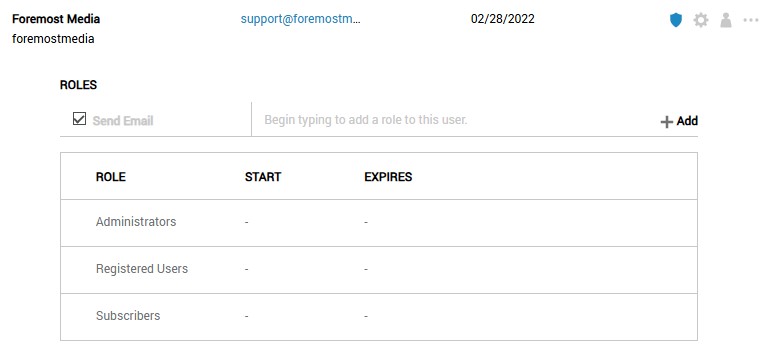
- Go back to the user and click on the shield icon to add a user role to the new account.
9. What’s included in ongoing support or maintenance, and what isn’t?
Support agreements can include work from all of Foremost Media’s team members, including Development, Marketing, and Design. While support agreements can also include maintenance such as updating WordPress plugins, maintenance agreements do not cover content updates, SEO, or design work.
10. How do I edit or add new pages, blog posts, or products?
To edit your website content, we encourage you to reference the recording you received after your training session, or browse the guides and video tutorials available in the support section of our website.
11. Can I upload images and videos directly, or are there size/format restrictions?
You can upload images directly. The best solution for videos is to upload them to YouTube/Vimeo, then embed them—don’t upload large videos directly. YouTube/Vimeo are optimized for streaming and adjust video quality automatically to match the viewer’s internet speed, reducing buffering.
We encourage using .webp format for images, regardless of whether it’s a photo or graphic with a transparent background. That is the preferred, next-gen file format that we use during development, which typically results in a smaller file size without compromising image quality. For nopCommerce, you can use .jpg for photos and .png for graphics/logos since the uploader currently does not support webp format.
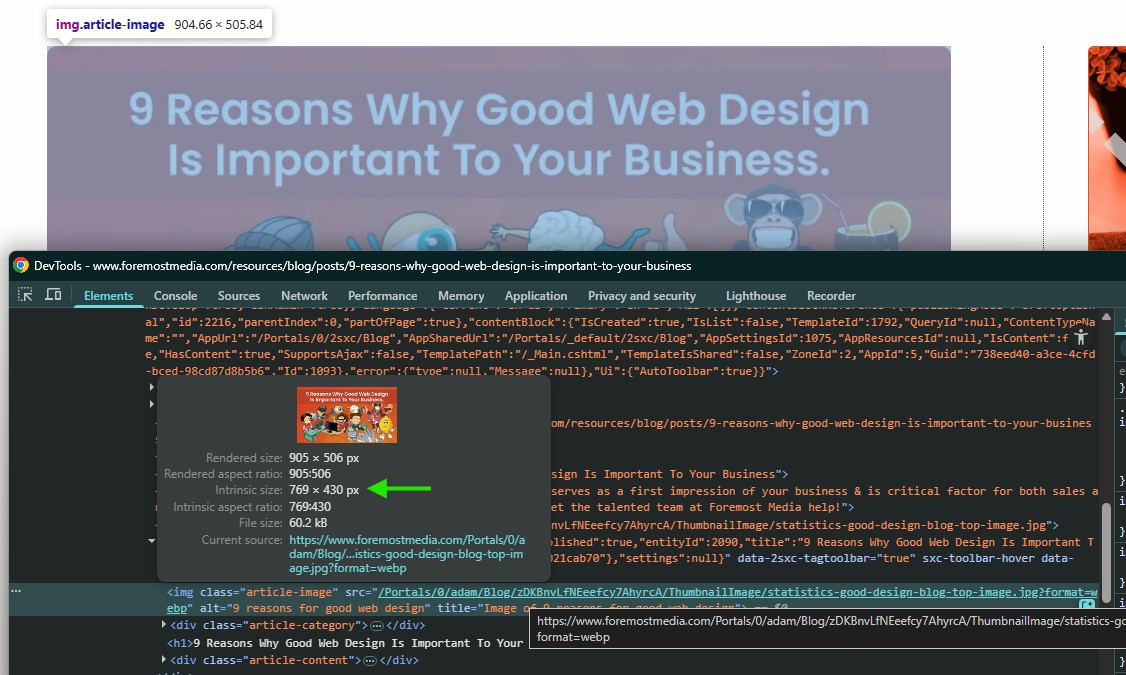
Try to keep image files under 200K for faster loading. The best practice for size is to make images no larger than the largest width they render on a given device. You can use the developer tools in a browser to inspect and see the image size.
12. Will changing text or images affect SEO or page performance?
Small edits typically won’t hurt. Major changes to headings, page titles, or URLs may affect SEO. If you’re not sure, ask us before making any big adjustments. If you have a monthly marketing agreement, consult with your account manager. We’d hate to see updates negatively affect any SEO work you’ve paid us to do.
13. How do I add new forms to my site?
If we built your site in WordPress, it’s likely that your forms are using Contact Form 7. You can view a basic tutorial in our WordPress Learning Center. Otherwise, let us know—we can create new forms that allow you to focus on other tasks. We’re always happy to help and will provide an estimate for billable work if you request one.
14. How do I see how many people are visiting my website?
We’ve connected your site to Google Analytics. You can log in anytime to view traffic, page views, and visitor behavior. If you have a WordPress site, check the menu for Google Site Kit and log in to your account to view data in an easy-to-read dashboard. You can also go to analytics.google.com to view data. If you do not yet have access to your analytics account, simply request access and specify which email account you want to use.
15. How do I track leads, sales, or conversions from the website?
Conversions can be tracked in Google Analytics. Just let us know what you’d like to track and we can get that configured for you. If you’d like a custom report, we can set one up.
16. Is my site optimized for search engines (SEO), or do I need extra work?
Your site is set up with SEO best practices (mobile-friendly, fast loading, meta data, etc.). Your project may have included more in-depth SEO work. See your project proposal to determine what was included. Ongoing SEO—like content creation, link building, and keyword strategy—requires additional work and is best suited to a monthly marketing agreement.
17. How do I connect my website to Google Analytics, Google Search Console, or social media platforms?
Google Analytics and Search Console are already connected [if applicable]. For social media, just add your website link to your profiles. We can also add sharing buttons or feed integrations if desired.
18. How do I update contact info, business hours, or location across the site?
Go to the footer, contact page, or settings area in the WordPress dashboard to update details. For nopCommerce and DNN sites, these changes may require an update to the theme. You can create a ticket to request theme changes on those platforms.
19. What steps should I take to promote the website and drive more traffic?
Share your website on social media, add it to your email signature, run email/newsletter campaigns, and consider SEO or paid ads. A site is the foundation—promotion brings people in.
Have a question that isn't covered here? Our team is always happy to help you get the most out of your website. Contact us today.